Category: Other

  • Removing Git branches by mask

    When working in a team with Git, you often have to create and delete branches. If you are a terminal user like me, you can optimize branch deletion as follows. Maybe someone will come in handy, I use it all the time.

    Before:

    % git branch
      MOBL-2509/0
      MOBL-2509/1
      MOBL-2522/0
      MOBL-2522/1
      MOBL-2522/2
    * master
      release/5.4
    

    Apply:

    % git branch | grep "MOBL" | xargs git branch -d
    

    After:

    % git branch
    * master
      release/5.4
    
  • Merging Three Git Repositories Into One Repository Without Losing File History

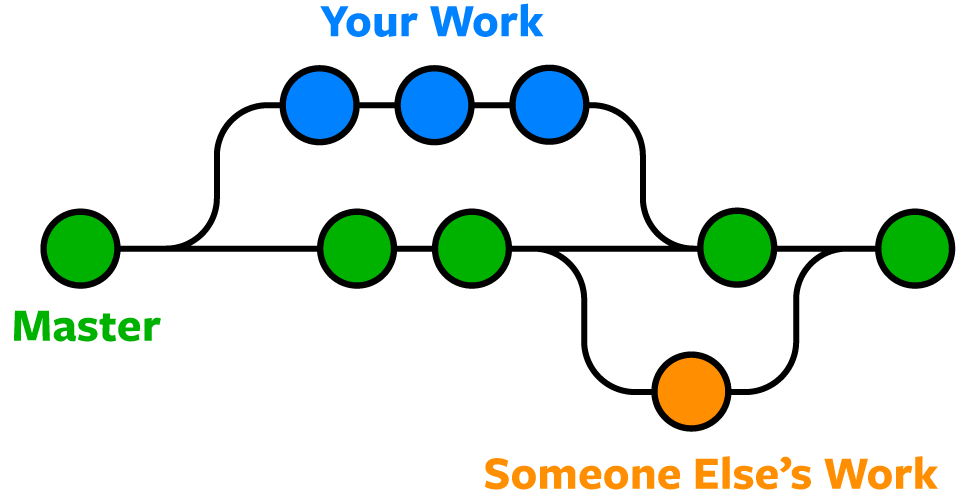
    Let’s assume that we have three separate git repos named uremont-client, uremont-service, uremont-sdk. We want to create a new repo, named uremont-ios, that contains all those repos in separate folders to have one single repo.

    Why do we want to do this? In my case I had two apps and one sdk for them, and it was inconvenient for me to push changes to three separate repos while I was working with these projects and sdk at the same time.

    Let’s start.

    Terminal setup to allow git to move all folders except one. We will need this later.

    $ shopt -s extglob
    

    Create a new folder uremont-ios and initialize git repo:

    $ mkdir uremont-ios 
    $ cd uremont-ios
    $ git init
    

    Add remote of first old project uremont-client that we want to merge to the new git repo and fetch it:

    $ git remote add -f uremont-client git@bitbucket.org:wzbozon/uremont.git
    

    Merge first old project uremont-client to the new repo:

    $ git merge uremont-client/master --allow-unrelated-histories
    

    Move all folders and files of that old project to the separate folder inside of our new project:

    $ mkdir uremont-client
    $ git mv ./!(uremont-client) ./uremont-client
    

    Commit changes:

    $ git commit -m 'Move uremont-client files into subdir'
    

    Similarly merge second old project uremont-service to the new repo:

    $ git remote add -f uremont-service git@bitbucket.org:wzbozon/uremontservice.git
    $ git merge uremont-service/master --allow-unrelated-histories
    $ mkdir uremont-service
    $ git mv ./!(uremont-client|uremont-service) ./uremont-service
    $ git commit -m 'Move uremont-service files into subdir'
    

    And third:

    $ git remote add -f uremont-sdk git@bitbucket.org:wzbozon/uremont-sdk.git
    $ git merge uremont-sdk/master --allow-unrelated-histories
    $ mkdir uremont-sdk
    $ git mv ./!(uremont-client|uremont-service|uremont-sdk) ./uremont-sdk
    $ git commit -m 'Move uremont-sdk files into subdir'
    

    Finally, add a new remote to our new repo and push it:

    $ git remote add origin git@bitbucket.org:wzbozon/uremont-ios.git
    $ git push -u origin master
    
  • Как стать хорошим разработчиком

    Полностью согласен с тем, что написано в этой статье.

    Чтобы быть хорошим разработчиком нужно:

    1. Писать код качественно и быстро. Именно в этом порядке приоритетов. Не работающий, но быстро написанный код не принесет компании хороших результатов. Если не хватает времени – это проблема планирования и менеджмента, а не проблема разработчика.

    2. Код должен быть читаемым и простым. Другие разработчики должны в нем легко разбираться. Отсюда следует, что код нужно хорошо комментировать, давать правильные названия сущностям (классам, объектам, методам).

    3. Тщательно тестировать свою работу до того, как отдавать ее на тестирование. Лучше самому найти 90% багов и сдать качественный продукт, чем потом вычищать сотни багов, найденные другими людьми в течение нескольких итераций. Нужно избегать переделок.

    4. Не жаловаться на проблемы, а решать их. Не измерять свою производительность количеством строк кода, а измерять количеством решенных проблем.

    5. Сначала решать проблему, а затем уже начинать писать код.

  • Mac AppStore app doesn’t load anything

    If you encountered this problem, try forcibly finishing up all *store* processes in Activity Monitor. This helped me.

    Скриншот 2015-10-26 16.15.54

  • Display driver NVIDIA Windows Kernel Mode Driver, Version xxx.xx stopped responding

    wddm_timeout

    I had this problem and tried many solutions from internet. But none of them worked in my case.

    I gave my video card to repair. They said, that rebolling needed. But after rebolling video card still didn’t work.

    I ended up just buying a new video card.