Blog

  • MVVM+C: Making Navigation Testable and Scalable

    AI helps us develop software faster, but faster changes also increase the risk of regressions. That makes strong automated test coverage even more important.

    Navigation is one area where plain MVVM often becomes difficult to test.

    The challenge with navigation in MVVM

    In a traditional MVVM setup, the ViewController usually handles both UI and navigation: pushing the next screen, composing modules, handling deep links, and managing flow decisions.

    Testing this through unit tests is difficult because the logic is tightly coupled to UIKit. As a result, navigation is often covered by UI tests.

    UI tests work, but they can be slow, flaky, and expensive to maintain, which can significantly hurt the developer experience.

    Moving navigation into a Coordinator

    MVVM+C addresses this by moving navigation into a Coordinator.

    The ViewController focuses on UI, while the Coordinator handles navigation, module composition, deep links, child flows, and flow completion.
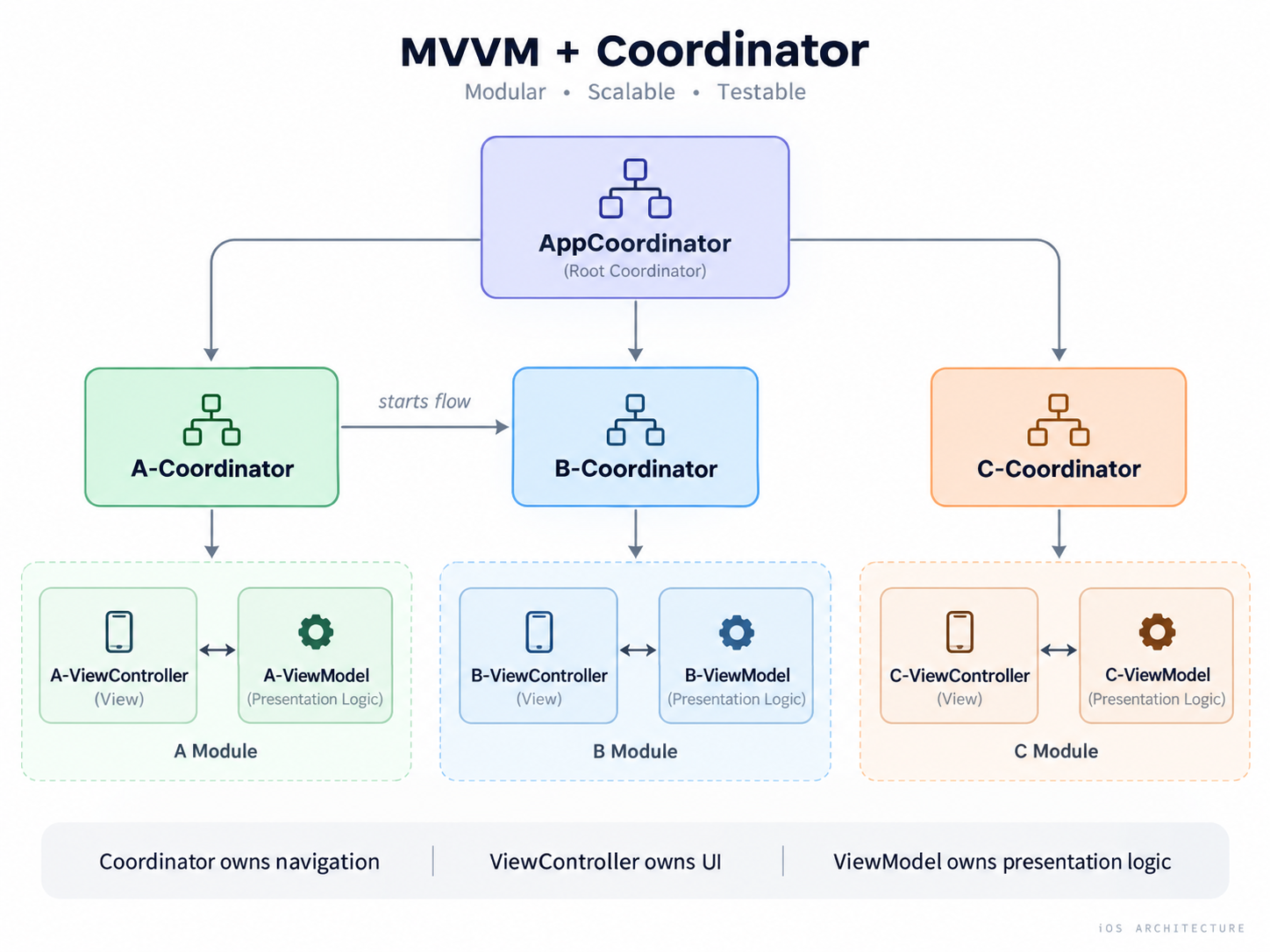
    MVVM + Coordinator architecture: AppCoordinator manages feature coordinators, with each module containing a ViewController and ViewModel.

    With navigation dependencies abstracted behind testable interfaces, this makes navigation decisions easier to cover with fast, reliable unit tests. UI tests can then focus on a small number of critical end-to-end scenarios.

    Scaling across features and teams

    Another benefit is loose coupling between modules. Each feature can own its own MVVM+C flow, which makes the architecture easier to scale across teams.

    MVVM+C is not just about cleaner navigation. It makes navigation isolated, scalable, and testable.

  • Removing Git branches by mask

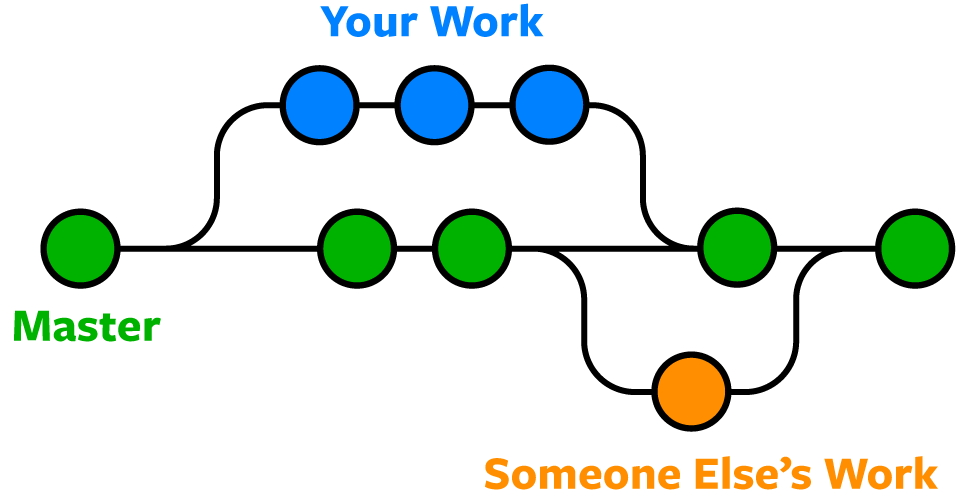
    When working in a team with Git, you often have to create and delete branches. If you are a terminal user like me, you can optimize branch deletion as follows. Maybe someone will come in handy, I use it all the time.

    Before:

    % git branch
      MOBL-2509/0
      MOBL-2509/1
      MOBL-2522/0
      MOBL-2522/1
      MOBL-2522/2
    * master
      release/5.4
    

    Apply:

    % git branch | grep "MOBL" | xargs git branch -d
    

    After:

    % git branch
    * master
      release/5.4
    
  • How to add the SwiftLint without pain

    Why do you need SwiftLint?

    1. It speed ups code reviews, you stop wasting time on code formatting, force casting, and other common issues
    2. It improves the code quality, code becomes more readable, and maintainable

    Integration

    1. Add SwiftLint to a podfile

    Or use another option from the official documentation.

      # A tool to enforce Swift style and conventions.
      pod 'SwiftLint', '0.43.1'

    2. Add this .swiftlint.yml config file to the project root folder

    The main trick to make integration easy is to disable all rules at first.

    disabled_rules:
    - trailing_whitespace
    - force_cast
    - force_unwrapping
    - force_try
    - empty_string
    - line_length
    - mark
    - weak_delegate
    - unneeded_break_in_switch
    - identifier_name
    - function_parameter_count
    - unused_closure_parameter
    - vertical_whitespace
    - opening_brace
    - control_statement
    - statement_position
    - comma
    - colon
    - trailing_comma
    
    opt_in_rules:
    - empty_count
    - empty_string
    
    excluded:
    - Carthage
    - Pods
    - SwiftLint/Common/3rdPartyLib
    
    line_length:
        warning: 150
        error: 200
        ignores_function_declarations: true
        ignores_comments: true
        ignores_urls: true
    
    function_body_length:
        warning: 300
        error: 500
    
    function_parameter_count:
        warning: 6
        error: 8
    
    type_body_length:
        warning: 300
        error: 500
    
    file_length:
        warning: 1000
        error: 1500
        ignore_comment_only_lines: true
    
    cyclomatic_complexity:
        warning: 15
        error: 25
    
    reporter: "xcode"

    3. Build a project, add additional rules to the disabled_rules section, if there are many warnings for them

    4. Delete rules from the disabled_rules section one by one and fix all the warnings

    5. Leave the trailing_whitespace and other rules that you don’t want to fix in the disabled_rules section

    In the end, you will have something like this in your config file.

    disabled_rules:
    - trailing_whitespace
    
    opt_in_rules:
    - empty_count
    - empty_string
    
    excluded:
    - Carthage
    - Pods
    - SwiftLint/Common/3rdPartyLib
    
    line_length:
        warning: 150
        error: 200
        ignores_function_declarations: true
        ignores_comments: true
        ignores_urls: true
    
    function_body_length:
        warning: 300
        error: 500
    
    function_parameter_count:
        warning: 6
        error: 8
    
    type_body_length:
        warning: 300
        error: 500
    
    file_length:
        warning: 1000
        error: 1500
        ignore_comment_only_lines: true
    
    cyclomatic_complexity:
        warning: 15
        error: 25
    
    reporter: "xcode"

    Some ideas on how to fix common code issues

    Force Cast Violation: Force casts should be avoided. (force_cast)

    Problem:

    let cell = collectionView.dequeueReusableCell(
        withReuseIdentifier: "DocumentCollectionViewCell",
        for: indexPath
    ) as! DocumentCollectionViewCell
    

    Solution:

    guard let cell = collectionView.dequeueReusableCell(
        withReuseIdentifier: "DocumentCollectionViewCell",
        for: indexPath
    ) as? DocumentCollectionViewCell else { fatalError() }
    

    Force Try Violation: Force tries should be avoided. (force_try)

    Problem:

    let workingDirectory = try! FileManager.default.url(
        for: .documentDirectory,
        in: .userDomainMask,
        appropriateFor: nil,
        create: false
    )
    

    Solution:

    do {
        let workingDirectory = try FileManager.default.url(
            for: .documentDirectory,
            in: .userDomainMask,
            appropriateFor: nil,
            create: false
        )
    } catch {
        print(error)
    }
    

    Exceptions

    In very rare cases you will not be able to fix the warning. For example, when you use a framework and you cannot easily change its API. Then you can switch off a SwiftLint rule for a particular code block using // swiftlint:disable rule_name and // swiftlint:enable rule_name comments.

  • Мой конспект Apple Event June 2021


    Apple показали iOS 15, Mac OS Monterey и многое другое. Это мой конспект, который я использую, чтобы не забыть важные моменты для себя. Записи сделал с точки зрения возможностей практического применения.

    Что нового для пользователей

    Live Text

    • Можно будет фотографировать названия, состав товаров и переводить в текстовый вид, чтобы находить инструкции, отзывы в интернете, страницы товаров у производителей.
    • Можно фотографировать объявления на стенах и переводить в цифровой текстовый вид,
    • чтобы потом копировать адрес, телефон.

    Maps

    • Immersive walking instructions можно будет использовать в поездках в места, где это хорошо работает.

    Universal Controls

    • Можно будет использовать iPad как второй переносной экран к Macbook

    Safari Tab groups

    • Это лучше, чем закладки в папках, так как закладки остаются навсегда, но при этом не хочется захламлять свои закладки временными вкладками, которые хочется продолжить изучать только завтра.

    Spatial Audio

    • AirPods Pro дают не только шумоподавление, но и пространственный звук, который стал еще лучше

    iOS Focus

    • По моему личному опыту фокус очень важен для продуктивности. Можно будет группировать уведомления с приложений. Я выключал все уведомления со всех мессенджеров, кроме рабочего и со всех соц. сетей. Из-за этого я иногда пропускал важные сообщения. Теперь верну их, но создам для них отдельную группу, чтобы читать их только когда не работаю.

    Shortcuts app on Mac

    • Любая автоматизация увеличивает производительность. Я уже использую автоматизацию в Trello для обновления чек-листов и задач на день. Можно будет использовать для автоматизации открытия наборов окон перед работой над разными проектами. Это позволит быстрее приступать к работе.

    Privacy

    • Борьба со спамом и трекингом, анонимность в интернете – это хорошо и важно. Privacy в Apple Mail позволит запретить трекинг открытия письма через скрытый пиксель. Появится защита IP адреса в Mail.
    • С помощью Hide My Email в составе iCloud + можно будет создавать о прокси email адреса для всяких мелких сервисов и магазинов, чтобы скрыть свой настоящий адрес

    SpotLight, Health, Photos, Watch OS

    • Много мелких улучшений, хорошо в целом

    SharePlay, Facetime, Message

    • API SharePlay станет доступно для приложений
    • Не использовал и не собираюсь – не хватает кроссплатформенности и ее не добавили.

    Что нового для разработчиков

    APIs

    • SharePlay
    • Voice isolation, wide spectrum audio, portrait mode for video conferencing apps
    • New APIs for Focus and Notifications, for screen time
    • RealityKit, Object Capture для мерчендайза с AR

    Swift

    • Concurrency (async, await, actor)

    AppStore

    • Multiple product pages
    • In-App events

    XCode Cloud

    • build in cloud
    • test in cloud in parallel
    • distribute to testers

    TestFlight for Mac

    Ссылки

    Apple Event 2021, WWDC

    https://www.apple.com/apple-events/june-2021/

    iOS 15

    https://www.apple.com/ios/ios-15-preview/

    Mac OS X Monterey

    https://www.apple.com/macos/monterey-preview/

  • iOS – How to remove “Back” text from the back button

    The best solution is to create base classes for UIViewController and UITableViewController and override their init methods. This will allow you to add ViewControllers to the NavigationController programmatically after a rootViewController. If you put this code in the ViewDidLoad method, it will not be called in this case and the next controller will be pushed with a back text.

    BaseViewController in Objective C:

    #import "BaseViewController.h"
    
    @interface BaseViewController ()
    
    @end
    
    @implementation BaseViewController
    
    - (instancetype)initWithNibName:(NSString *)nibNameOrNil bundle:(NSBundle *)nibBundleOrNil
    {
     self = [super initWithNibName:nibNameOrNil bundle:nibBundleOrNil];
     if (self) {
     self.navigationItem.backBarButtonItem = [[UIBarButtonItem alloc] initWithTitle:@"" style:UIBarButtonItemStylePlain target:nil action:nil];
     }
     return self;
    }
    
    @end
    

    BaseTableViewController:

    #import "BaseTableViewController.h"
    
    @interface BaseTableViewController ()
    
    @end
    
    @implementation BaseTableViewController
    
    - (instancetype)initWithStyle:(UITableViewStyle)style
    {
     self = [super initWithStyle:style];
     if (self) {
     self.navigationItem.backBarButtonItem = [[UIBarButtonItem alloc] initWithTitle:@"" style:UIBarButtonItemStylePlain target:nil action:nil];
     }
     return self;
    }
    
    @end
    
  • Using SFSafariViewController to open URL inside app without transitioning to Safari or using WebView

    RxSwift/RxCocoa example:

    import SafariServices
    
    learnMoreButton.rx.tap
        .subscribe(onNext: {
            guard let url = URL(string: "https://google.com") else { return }
            let svc = SFSafariViewController(url: url)
            self.present(svc, animated: true, completion: nil)
        })
        .disposed(by: disposeBag)
    
  • Merging Three Git Repositories Into One Repository Without Losing File History

    Let’s assume that we have three separate git repos named uremont-client, uremont-service, uremont-sdk. We want to create a new repo, named uremont-ios, that contains all those repos in separate folders to have one single repo.

    Why do we want to do this? In my case I had two apps and one sdk for them, and it was inconvenient for me to push changes to three separate repos while I was working with these projects and sdk at the same time.

    Let’s start.

    Terminal setup to allow git to move all folders except one. We will need this later.

    $ shopt -s extglob
    

    Create a new folder uremont-ios and initialize git repo:

    $ mkdir uremont-ios 
    $ cd uremont-ios
    $ git init
    

    Add remote of first old project uremont-client that we want to merge to the new git repo and fetch it:

    $ git remote add -f uremont-client git@bitbucket.org:wzbozon/uremont.git
    

    Merge first old project uremont-client to the new repo:

    $ git merge uremont-client/master --allow-unrelated-histories
    

    Move all folders and files of that old project to the separate folder inside of our new project:

    $ mkdir uremont-client
    $ git mv ./!(uremont-client) ./uremont-client
    

    Commit changes:

    $ git commit -m 'Move uremont-client files into subdir'
    

    Similarly merge second old project uremont-service to the new repo:

    $ git remote add -f uremont-service git@bitbucket.org:wzbozon/uremontservice.git
    $ git merge uremont-service/master --allow-unrelated-histories
    $ mkdir uremont-service
    $ git mv ./!(uremont-client|uremont-service) ./uremont-service
    $ git commit -m 'Move uremont-service files into subdir'
    

    And third:

    $ git remote add -f uremont-sdk git@bitbucket.org:wzbozon/uremont-sdk.git
    $ git merge uremont-sdk/master --allow-unrelated-histories
    $ mkdir uremont-sdk
    $ git mv ./!(uremont-client|uremont-service|uremont-sdk) ./uremont-sdk
    $ git commit -m 'Move uremont-sdk files into subdir'
    

    Finally, add a new remote to our new repo and push it:

    $ git remote add origin git@bitbucket.org:wzbozon/uremont-ios.git
    $ git push -u origin master
    
  • Chaining example on RxSwift

    This is one of the reasons I love RxSwift. It allows to chain requests beautifully.

    Here I authorize user by getting auth token, then I request userInfo, then I request profile.

    func loadUserInfoAndProfile(login: String, password: String) {
        UserManager.shared.auth(login: login, password: password)
            .flatMap { _ in
                return UserManager.shared.info()
            }
            .map { (result: APIResult) -> UserInfo? in
                switch result {
                case .success(let value):
                    UserManager.shared.userInfo = value
                    return value
                case .failure(let error):
                    print(error)
                    return nil
                }
            }
            .flatMap { userInfo in
                return ServiceManager.shared.profileView()
            }
            .map { (result: APIResult) -> ServiceProfile? in
                switch result {
                case .success(let value):
                    ServiceManager.shared.profile.value = value
                    return value
                case .failure(let error):
                    print(error)
                    return nil
                }
            }
            .subscribe(onNext: { _ in
                self.showTabs()
            }, onError: { error in
                self.showTutorialViewController()
            })
            .disposed(by: disposeBag)
    }
    
  • Что нового в iOS 12

    ARKit 2
    Multiuser and Persistent AR. – сохранение данных из AR сессии в приложении, многопользовательский режим AR.
    Object Detection. – распознавание объектов реального мира и добавление их в AR приложения.

    Siri Shortcuts
    Siri предсказывает быстрый доступ (shortcuts) для действий в приложении.

    Health Records
    Доступ к информации о здоровье в приложениях.

    Effects
    Показ стикеров и сообщений в iMessage в виде эффектов.

    Interactive Controls in Notifications
    Полная кастомизация уведомлений.

    Authentication Services
    Позволяет шарить логин-сессию между Safari и приложением, чтобы логинить пользователя проще.

    CarPlay for Navigation Apps

    Network Framework
    Доступ к протоколам TLS, TCP, UDP.
    URLSession, работающий с HTTP, построен поверх этого фреймворка.

    Natural Language
    Получение метаданных из текста.

    Deprecation of OpenGL ES
    OpenGL ES deprecated, необходимо использовать только Metal.