Blog

  • Язык программирования Go

    Посоветовали обратить внимание на этот язык программирования Go.

    Выглядит с первого взгляда как некий апгрейд языка C с добавлением garbage collection, type safety, dynamic typing, variable length arrays, key-value maps, large standard library. Нет наследования как в C++, но есть композиция и интерфейсы. Более быстрая компиляция, чем в C++ и лучше поддержка многопоточности.

    https://en.wikipedia.org/wiki/Go_(programming_language)

  • Что нового в iOS 9

    Новинки в iOS 9:

    1. Новое встроенное приложение News, улучшения Notes, Maps, Wallet, CarPlay.

    2. На iPad появится Split View, можно будет пользоваться несколькими приложениями одновременно, например, Safari и Twitter.

    3. Siri станет умнее. Например, можно будет попросить Siri напомнить о чем-то, когда ты будешь дома. Она сама создает уведомление с привязкой к локализации.

    4. Улучшения производительности. Батарея на 1 час дольше будет держаться. Встроенные приложения начнут использовать Metal, то есть по сути графический процессор. Для обновления системы достаточно будет не 4, а 1 гб свободной памяти.

    http://www.apple.com/ios/ios9-preview/

    #iOS9, #Apple

  • How to clean all targets in XCode 6 including Pods

    When you clean a project, you actually clean only main target. If you want to clean all targets, for example, Pods after installing new versions of pods, you should use another option.

    To clean all targets in XCode 6 including Pods use Shift+Cmd+Alt+K button. It calls “Clean Build Folder…” command, which is not visible from menus.

    Probably, I don’t know something, because this way of cleaning seems to be not so obvious.

  • 6 наиболее важных новинок в Android 5.0 Lollipop с точки зрения разработчика

    Android

    Официальный выход Android 5.0 состоялся 3 ноября 2014 года. Я изучил новинки Android 5.0 Lollipop, поставил на свой Google Nexus 5, посмотрел своими глазами. На официальной странице все можно посмотреть и понять, правда скрыт факт изменения среды выполнения, так как это информация для пользователей. Просмотрел все популярные обзоры, но наилучшим источником на русском языке оказалась статья в Википедии.

    Итак, наиболее важные новинки с моей точки зрения (по убыванию):

    1. Переход на виртуальную машину Android Runtime (ART), официально сменяющую Dalvik для повышения производительности и оптимизации, направленной на повышение энергоэффективности системы. Это ведет к увеличению времени работы батареи и отсутствию лагов во всем. Надеюсь, что правда, сложно проверить.
    2. Поддержка 64 битной архитектуры, 64-битных устройств и систем-на-чипе. Система на чипе или система на кристалле – это электронная схема, выполняющая функции целого устройства (например, компьютера) и размещенная на одной интегральной схеме.
    3. Улучшенные сетевые передачи и улучшенное подключение к интернету везде. Надеюсь, что правда, сложно проверить.
    4. Android 5 Lollipop теперь поддерживает не только смартфоны и планшеты, но и системы в автомобилях, часы и телевизоры.
    5. Еще больше настроек уведомлений. Теперь показывается оценка времени заряда батареи. И другие мелкие настройки, которыми будут пользоваться только гики.

      android-5.0-battery

    6. Новый дизайн под названием “Material design”. И он явно лучше, чем то, что было раньше. Хотя новый внешний вид трех главных кнопок мне лично не нравится. Поменялись анимации. Сильно изменилась клавиатура – но не уверен, что теперь она лучше. Вообще, не уверен, что мусолить дизайн и кричать о изменениях в нем как о чем-то крупном целесообразно.
    7. nexus2cee_image36

  • My visit to a YaC 2014 Conference (Mobile section)

    YaC 2014 – Yet Another Conference was organized by Yandex in Moscow in October 2014. It is a largest developer conference in Russia. I have participated only in a Mobile section.

    There was a presentation from Orta Therox – the creator of CocoaPods, called “Tools, Testing and new New Team Members. The Story of Post 1.0”. Here is his presentation.

    A presentation from Ashley Nelson-Hornstein from Dropbox called “Building Quality Code That Lasts: A Dropbox Story”

    and some other presentations from Russian developers.

    All materials are published now and available for free.

    What I did get from all that is something new about unit and integration testing – using mocks to speed up network connection related tests, information about some new instruments and team development, something new about View stacks and some understanding of possibilities of using JavaScript in a new iOS WebView – WKWebView. Found a new friend – another mobile developer.

    Here are some of my own photos:

  • How to safely work with NSDictionary that may have empty values or may not have a key

    Dictionary_2x

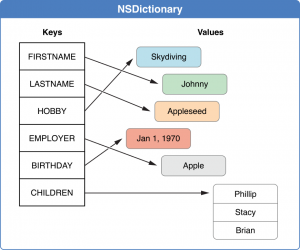
    NSDictionary sometimes can contain a key with empty values or even may not contain a key, that we expect to have. This is a very common problem, when you work with server APIs and parse network JSON responses to a NSDictionary. In this post I will describe how to safely work with NSDictionary that may have empty values or may not have a key.

    The method objectForKey will return nil, if there is no a key, a key doesn’t exist in a dictionary.

    You can’t add nil to a NSDictionary. NSDictionary will throw an NSInvalidArgumentException if you attempt to insert a nil value. You would have to use [NSNull null] instead. NSNull is something called nothing, while nil is simply nothing.

    Checks that value for key is not empty.

    if (dic[@"key"] != (id)[NSNull null]) {
    }
    

    But if a dic doesn’t contain a key, you will enter to the body of a condition dic[@”key”] != (id)[NSNull null].

    For example, before taking integerValue from obj, you must be sure, that it is not [NSNull null]:

    id obj = dic[@"key"];
    if (obj != (id)[NSNull null]) {
       cityId = [obj integerValue];
    }
    

    Checks that the key exists, but value for it can still be empty.

    if (dic[@"key"] != nil) {
    }
    

    So the optimal check while reading NSDictionary is this, where key is “key”

    id obj = dic[@"key"];
    if ((obj != nil) && (obj != (id)[NSNull null])) {
    }
    

    You can’t add nil to a NSDictionary. So you have to check, that your object is not nil before adding:

    if (obj != nil) {
       NSDictionary *dic = @{@"key":obj};
    }
    

    But you can add [NSNull null]:

    id obj = [NSNull null];
    NSDictionary *dic = @{@"key":obj};
    

    Version of code, where you check if dictionary entry exists and not empty:

    id obj = dic[@"key"];
    if ( obj != nil ) {
        if ( obj != (id)[NSNull null] ) {
            // Use obj to get data
        }
        else {
            NSLog(@"Warning! ClassName: key section is empty.");
        }
    }
    else {
        NSLog(@"Warning! ClassName: key section is not found.");
    }
    

    I have created a NSDictionary category that has a method to check if a key exists and value is not empty:

    #import "NSDictionary+CheckKey.h"
    
    @implementation NSDictionary (CheckKey)
    
    
    - (BOOL)checkKey:(NSString *)key className:(NSString *)className
    {
        BOOL success = NO;
        id obj = self[key];
        if ( obj != nil ) {
            if ( obj != (id)[NSNull null] ) {
                success = YES;
            }
            else {
                NSLog(@"Warning! %@: %@ section is empty.", className, key);
            }
        }
        else {
            NSLog(@"Warning! %@: %@ section is not found.", className, key);
        }
        
        return success;
    }
    
    
    @end
    

    This is an example, how to use it:

    if ([dic checkKey:@"key" className:NSStringFromClass(self.class)]) {
        self.object = dic[@"key"];
    }
    
  • iOS : Creating Random E-mail and Phone Number

    roulette_lg

    This is a sample code how to create random e-mail and phone number. I used it in my unit tests of authorization.

    - (NSString *)randomEmail
    {
        //Format:xxxxx@rdw.ru
        NSString *alphabet  = @"abcdefghijklmnopqrstuvwxyz0123456789";
        NSString *randomString = [self randomStringWithAlphabet:alphabet numberOfChars:5];
        NSString *randomEmail = [NSString stringWithFormat:@"%@@rdw.ru", randomString];
        NSLog(@"randomEmail: %@", randomEmail);
        
        return randomEmail;
    }
    
    
    - (NSString *)randomPhoneNumber
    {
        //Format:89xxxxxxxxx
        NSString *alphabet  = @"0123456789";
        NSString *randomString = [self randomStringWithAlphabet:alphabet numberOfChars:9];
        NSString *randomPhoneNumber = [NSString stringWithFormat:@"89%@", randomString];
        NSLog(@"randomPhoneNumber: %@", randomPhoneNumber);
        
        return randomPhoneNumber;
    }
    
    
    - (NSString *)randomStringWithAlphabet:(NSString *)alphabet numberOfChars:(NSInteger)numberOfChars
    {
        NSMutableString *s = [NSMutableString stringWithCapacity:numberOfChars];
        for (NSUInteger i = 0U; i < numberOfChars; i++) {
            u_int32_t r = arc4random() % [alphabet length];
            unichar c = [alphabet characterAtIndex:r];
            [s appendFormat:@"%C", c];
        }
        
        return s;
    }
    
  • Solution for iOS Developer Technical Interview Problem

    I have found an interesting iOS Developer Technical Interview Problem and solved it.

    “I also have the ultimate iOS Developer technical test you can assign a potential hire. It should take 1-3 hours. It is easy to communicate, allows a lot of freedom of implementation so you can really get a better picture into how a developer thinks, and will make sure this developer knows the absolute fundamentals. Ready for it?

    Calculate the and display each Fibonacci number from 1 -> max N possible on an iPhone with unsigned integers, and display each F(n) in a table view. The UITableView scrolling MUST remain smooth.

    That’s it. You’ll be amazed at how profoundly simple this task sounds and yet how much iOS knowledge can be demonstrated. Not just what they know, but how they structure their work. You can assess their APIs, their separation of concerns when designing classes, the considerations they’ve made for performance, and their knowledge of concurrency. (Not to mention their knowledge of recursive functions.) It is ok to give them the formula, and allow them to use Google. F(n) = F(n-1) + F(n-2).”

    This is the result:
    IMG_0051

    GitHub repository with a solution is here.

    I used recursion and concurrency. I added a little delay of 0.1 s to make a delay visible but scrolling is still smooth. This is my solution:

    //
    //  FiboTableViewController.m
    //  fibo
    //
    //  Created by Dennis Kutlubaev on 05.11.14.
    //  Copyright (c) 2014 Alwawee. All rights reserved.
    //
    
    #import "FiboTableViewController.h"
    
    
    @interface FiboTableViewController ()
    {
        NSInteger _maxN;
        dispatch_queue_t _backgroundQueue;
    }
    
    @property (nonatomic, strong) NSMutableArray *tableData;
    
    
    @end
    
    
    @implementation FiboTableViewController
    
    
    - (void)viewDidLoad
    {
        [super viewDidLoad];
        
        NSLog(@"Max Integer: %ld", NSIntegerMax);
        
        _maxN = 10000;
        
        _backgroundQueue = dispatch_queue_create("background queue", nil);
        
        [self loadData];
    }
    
    
    - (void)loadData
    {
        _tableData = [NSMutableArray arrayWithArray:@[@(1),@(2)]];
    }
    
    
    #pragma mark - Table view data source
    
    - (NSInteger)numberOfSectionsInTableView:(UITableView *)tableView
    {
        return 1;
    }
    
    - (NSInteger)tableView:(UITableView *)tableView numberOfRowsInSection:(NSInteger)section
    {
        return _maxN;
    }
    
    
    - (UITableViewCell *)tableView:(UITableView *)tableView cellForRowAtIndexPath:(NSIndexPath *)indexPath
    {
        UITableViewCell *cell = [[UITableViewCell alloc] initWithStyle:UITableViewCellStyleDefault reuseIdentifier:nil];
        
        NSInteger n = indexPath.row;
        __block NSInteger fibo;
        if ( n < [_tableData count] ) {
            fibo = [_tableData[n] integerValue];
            if (fibo > 0) {
                dispatch_async(dispatch_get_main_queue(), ^{
                    cell.textLabel.text = [NSString stringWithFormat:@"%ld", (long)fibo];
                });
            }
        }
        else {
            dispatch_async(_backgroundQueue, ^{
                
                fibo = [self fibo:n];
                dispatch_async(dispatch_get_main_queue(), ^{
                    if (fibo > 0) {
                        cell.textLabel.text = [NSString stringWithFormat:@"%ld", (long)fibo];
                    }
                    else {
                        [self.tableView reloadData];
                        //cell.textLabel.text = [NSString stringWithFormat:@"Max integer reached: %ld", NSIntegerMax];
                    }
                });
                
            });
        }
        
        return cell;
    }
    
    
    //F(n) = F(n-1) + F(n-2)
    - (NSInteger)fibo:(NSInteger)n
    {
        NSInteger f;
        
        if ( n < [_tableData count] ) {
            f = [_tableData[n] integerValue];
        }
        else {
            [NSThread sleepForTimeInterval:0.1];
            
            f = [self fibo:(n-2)] + [self fibo:(n-1)];
            
            if ((f < NSIntegerMax)&&(f > 0)) {
                [_tableData addObject:@(f)];
            }
            else {
                f = 0;
                _maxN = n-1;
            }
        }
        
        return f;
    }
    
    
    @end


    It scrolls without lags on iPhone 6 Plus. I do not calculate twice a fibonacci number if already have calculated it, I store a new fibonacci number in a NSMutableArray.

  • Using dispatch group to wait until multiple operations executed – including completion block (AFNetworking)

    // Загрузка дополнительных данных с сервера по API для форм
    - (void)loadAdditionalInformationFromServer
    {
        loadingError = nil;
        success = YES;
        
        group = dispatch_group_create();
        
        [self startOfferEducationsRetrieveOperation];
        
        [self startOfferLanguageLevelsRetrieveOperation];
        
        [self startOfferTradesRetrieveOperation];
        
        [self startOfferLanguagesRetrieveOperation];
        
        [self startOperatingScheduleRetrieveOperation];
        
        [self startRegionsRetrieveOperation];
        
        dispatch_group_notify(group, dispatch_get_main_queue(), ^{
         [self.delegate resumeManagerDidFinishLoadingAdditionalInformationWithSuccess:success error:loadingError];
        });
        
        //dispatch_group_wait(group, DISPATCH_TIME_FOREVER);
    
        dispatch_release(group);
    }
    
    
    // Запрос на получение уровней образования
    - (void)startOfferEducationsRetrieveOperation
    {
        if ([[RRSession sharedSession] offerEducations] == nil) {
            
            // Блок успешного завершения запроса
            SuccessBlock successBlock = ^(NSURLRequest *request, NSHTTPURLResponse *response, id JSON) {
                
                NSArray *jsonArray = (NSArray *)JSON;
                NSMutableArray *temp = [NSMutableArray new];
                for (NSDictionary *jsonDic in jsonArray) {
                    RROfferEducation *obj = [[RROfferEducation alloc] initFromDic:jsonDic];
                    [temp addObject:obj];
                }
                [[RRSession sharedSession] setOfferEducations:temp];
                
                dispatch_group_leave(group);
            };
            
            // Добавление запроса на загрузку в очередь
            [self addOperationForMethod:RRApiMethodOfferEducations successBlock:successBlock];
        }
    }
    
    
    // Запрос на получение уровней владения языком
    - (void)startOfferLanguageLevelsRetrieveOperation
    {
        if ([[RRSession sharedSession] offerLanguageLevels] == nil) {
            // Блок успешного завершения запроса
            SuccessBlock successBlock = ^(NSURLRequest *request, NSHTTPURLResponse *response, id JSON) {
                
                NSArray *jsonArray = (NSArray *)JSON;
                NSMutableArray *temp = [NSMutableArray new];
                for (NSDictionary *jsonDic in jsonArray) {
                    RROfferLanguageLevel *obj = [[RROfferLanguageLevel alloc] initFromDic:jsonDic];
                    [temp addObject:obj];
                }
                [[RRSession sharedSession] setOfferLanguageLevels:temp];
                
                dispatch_group_leave(group);
            };
            
            // Добавление запроса на загрузку в очередь
            [self addOperationForMethod:RRApiMethodOfferLanguageLevels successBlock:successBlock];
        }
    }
    
    
    // Запрос на получение языков
    - (void)startOfferLanguagesRetrieveOperation
    {
        if ([[RRSession sharedSession] offerLanguages] == nil) {
            // Блок успешного завершения запроса
            SuccessBlock successBlock = ^(NSURLRequest *request, NSHTTPURLResponse *response, id JSON) {
                
                NSArray *jsonArray = (NSArray *)JSON;
                NSMutableArray *temp = [NSMutableArray new];
                for (NSDictionary *jsonDic in jsonArray) {
                    RROfferLanguage *obj = [[RROfferLanguage alloc] initFromDic:jsonDic];
                    [temp addObject:obj];
                }
                [[RRSession sharedSession] setOfferLanguages:temp];
                
                dispatch_group_leave(group);
            };
            
            // Добавление запроса на загрузку в очередь
            [self addOperationForMethod:RRApiMethodOfferLanguages successBlock:successBlock];
        }
    }
    
    
    // Запрос на получение графиков работы
    - (void)startOperatingScheduleRetrieveOperation
    {
        if ([[RRSession sharedSession] operatingSchedules] == nil) {
            // Блок успешного завершения запроса
            SuccessBlock successBlock = ^(NSURLRequest *request, NSHTTPURLResponse *response, id JSON) {
                
                NSArray *jsonArray = (NSArray *)JSON;
                NSMutableArray *temp = [NSMutableArray new];
                for (NSDictionary *jsonDic in jsonArray) {
                    RROperatingSchedule *obj = [[RROperatingSchedule alloc] initFromDic:jsonDic];
                    [temp addObject:obj];
                }
                [[RRSession sharedSession] setOperatingSchedules:temp];
                
                dispatch_group_leave(group);
            };
            
            // Добавление запроса на загрузку в очередь
            [self addOperationForMethod:RRApiMethodOperatingSchedules successBlock:successBlock];
        }
    }
    
    
    // Запрос на получение регионов
    - (void)startRegionsRetrieveOperation
    {
        if ([[RRSession sharedSession] regions] == nil) {
            // Блок успешного завершения запроса
            SuccessBlock successBlock = ^(NSURLRequest *request, NSHTTPURLResponse *response, id JSON) {
                
                NSArray *jsonArray = (NSArray *)JSON;
                NSMutableArray *temp = [NSMutableArray new];
                for (NSDictionary *jsonDic in jsonArray) {
                    RRRegion *obj = [[RRRegion alloc] initFromDic:jsonDic];
                    [temp addObject:obj];
                }
                [[RRSession sharedSession] setRegions:temp];
                
                dispatch_group_leave(group);
            };
            
            // Добавление запроса на загрузку в очередь
            [self addOperationForMethod:RRApiMethodRegions successBlock:successBlock];
        }
    }
    
    
    // Запрос на получение рубрик вакансий
    - (void)startOfferTradesRetrieveOperation
    {
        if ([[RRSession sharedSession] offerTrades] == nil) {
            // Блок успешного завершения запроса
            SuccessBlock successBlock = ^(NSURLRequest *request, NSHTTPURLResponse *response, id JSON) {
                
                NSArray *jsonArray = (NSArray *)JSON;
                NSMutableArray *temp = [NSMutableArray new];
                for (NSDictionary *jsonDic in jsonArray) {
                    RROfferTrade *obj = [[RROfferTrade alloc] initFromDic:jsonDic];
                    [temp addObject:obj];
                }
                [[RRSession sharedSession] setOfferTrades:temp];
                
                dispatch_group_leave(group);
            };
            
            // Добавление запроса на загрузку в очередь
            [self addOperationForMethod:RRApiMethodOfferTrades successBlock:successBlock];
        }
    }
    
    
    // Добавление запроса на загрузку в очередь
    - (void)addOperationForMethod:(NSString *)methodName successBlock:(SuccessBlock)successBlock
    {
        dispatch_group_enter(group);
        
        RRHTTPClient *client = [RRHTTPClient sharedClient];
        NSString *apiMethodPath = [NSString stringWithFormat:@"%@%@", [RRHelper apiDomain], methodName];
        NSMutableURLRequest *request = [client requestWithMethod:@"GET" path:apiMethodPath parameters:nil];
        AFJSONRequestOperation *operation = [AFJSONRequestOperation JSONRequestOperationWithRequest:request success:successBlock failure:[self getStandartFailureBlock]];
        [operation start];
        
        //[[RRServerConnection sharedConnection] addCustomOperation:operation];
    }
    
    
    // Блок обработки ошибки при запросе
    - (FailureBlock)getStandartFailureBlock
    {
        FailureBlock failureBlock = ^(NSURLRequest *request, NSHTTPURLResponse *response, NSError *error, id JSON) {
            
            success = NO;
            loadingError = error;
            
            NSLog(@"Error: %@", error);
            [RRHelper showServerErrorMessage];
            
            dispatch_group_leave(group);
            
        };
        
        return failureBlock;
    }
    
  • Android Java Serialization Using Generics

    I have created a class – SerializationManager, it can serialize any objects and write them to files. It can be used to save and restore form states in Android. It is based on Java Generics. What is achieved by this is that you do not need to duplicate serialization code in every class.

    images

    Object must implement Serialized interface. Here form is an object instance of a class. It can be named as just obj.

    package com.alwawee.util;
    
    import android.content.Context;
    
    import java.io.FileInputStream;
    import java.io.FileOutputStream;
    import java.io.IOException;
    import java.io.ObjectInputStream;
    import java.io.ObjectOutputStream;
    
    public class SerializationManager {
    
        //================================================================================
        // Constructor
        //================================================================================
        public SerializationManager(){
    
        }
    
    
        //================================================================================
        // Other
        //================================================================================
        // Reads saved object from a file. Object must implement Serialized interface.
        public T readObjectFromFile(Context context, String className) {
            T form = null;
            try {
                String fileName = className + ".ser";
                FileInputStream fileInputStream = context.openFileInput(fileName);
                ObjectInputStream objectInputStream = new ObjectInputStream(fileInputStream);
                form = (T) objectInputStream.readObject();
                objectInputStream.close();
                fileInputStream.close();
            } catch (IOException e) {
                e.printStackTrace();
            }
            catch (ClassNotFoundException e) {
                e.printStackTrace();
            }
            return form;
        }
    
    
        // Serializes object and saves it to a file. File name is created using object type (class name). 
        public void saveObjectToFile(Context context, T form) {
            try {
                String fileName = form.getClass().getSimpleName() + ".ser";
                FileOutputStream fileOutputStream = context.openFileOutput(fileName, Context.MODE_PRIVATE);
                ObjectOutputStream objectOutputStream = new ObjectOutputStream(fileOutputStream);
                objectOutputStream.writeObject(form);
                objectOutputStream.close();
                fileOutputStream.close();
            } catch (IOException e) {
                e.printStackTrace();
            }
        }
    }
    

    This is how you can use it. First you declare a SerializationManager in your class and you tell it which class you are going to serialize:

    private SerializationManager manager;
    

    Then in onCreate method you create SerializationManager instance:

    @Override
        protected void onCreate(Bundle savedInstanceState) {
            manager = new SerializationManager();
    

    Writing object to a file:

    // Saving to a file
    manager.saveObjectToFile(this, form);
    

    Reading objects from saved file:

    // Reading form object from a file
    form = manager.readObjectFromFile(this, "CreateResumeForm");
    

    A little joke for reading to the end:
    java generics